6 n8n Workflows That Automate Your Entire Product Feedback Pipeline
From raw survey responses to triaged Linear tickets and weekly PM digests — here are six production-ready n8n workflows that close the feedback loop without a single spreadsheet.
Jordan Reeves
Developer Experience Lead
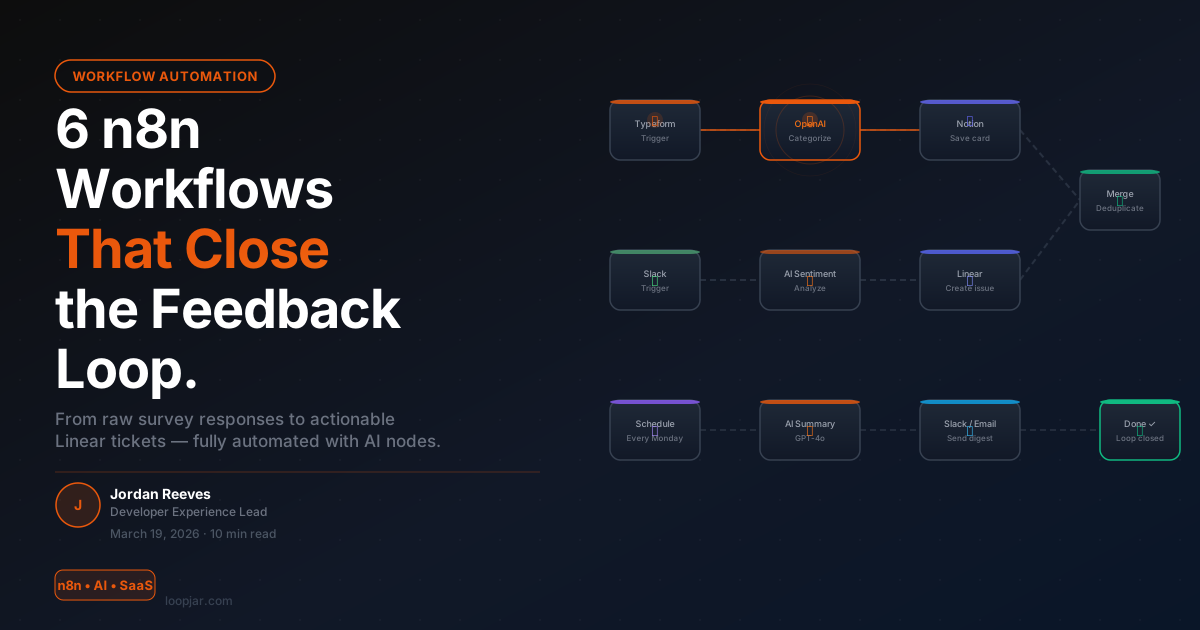
Here's a workflow most product teams live with: a user submits feedback via Typeform. It lands in a spreadsheet. Someone on the team manually reads it three days later, tags it, and maybe creates a Linear ticket. If it's urgent, it gets lost in Slack. If it's a feature request, it gets logged somewhere and never revisited.
That's not a feedback loop. That's a feedback dead end.
n8n — the open-source workflow automation platform that's exploded in 2026 as teams move away from expensive iPaaS tools — is the missing glue. Pair it with AI nodes (OpenAI, Claude, local models) and you can build a fully automated feedback pipeline that runs while your team sleeps.
Below are six production-ready workflows. You don't need to build all six — each is independent. Start with the one closest to your biggest pain point.
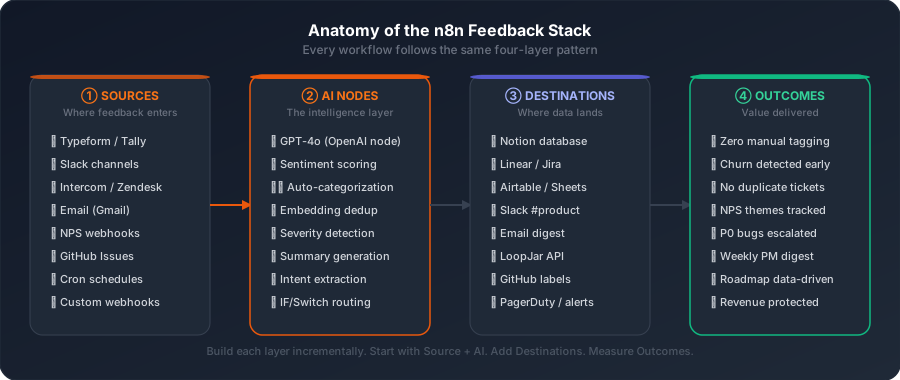
The Full Pipeline at a Glance
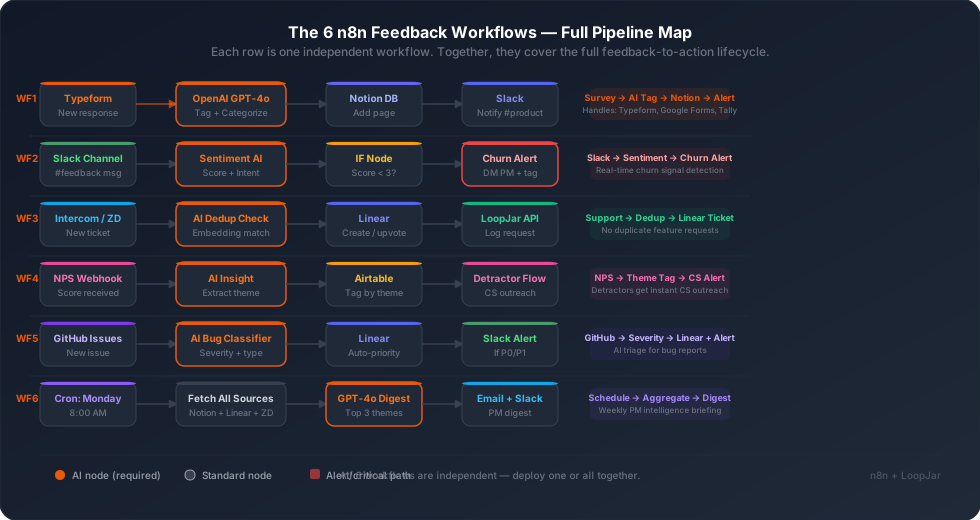
Workflow 1: Survey Response → AI Tag → Notion
The problem it solves: You run a Typeform survey, get 200 responses, and someone has to manually categorize every single one. This takes hours and introduces bias.
Trigger: Typeform "New Response" node (works equally with Google Forms, Tally, or any webhook-based form tool)
The flow:
- Typeform node fires when a new response arrives
- OpenAI node — send the response text with a system prompt: "Categorize this feedback into one of: Bug Report, Feature Request, UX Friction, Pricing Concern, Praise, or Other. Also rate sentiment 1-5."
- Set node — map the AI output to structured fields (category, sentiment, summary)
- Notion node — create a new database page with the structured data
- Slack node — post a one-line summary to
#product-feedbackwith the category and sentiment score
Time to build: ~45 minutes. Time saved per week: 3-5 hours of manual tagging.
Pro tip: Use n8n's Split In Batches node to backfill existing responses. One click processes your entire backlog overnight.
Workflow 2: Slack → Real-Time Sentiment Monitor → Churn Alert
The problem it solves: Frustrated users vent in your Slack community or customer channel before they send a formal support ticket — and long before they cancel. By the time a ticket exists, they've already decided to leave.
Trigger: Slack node watching a specific channel (e.g., #customer-feedback, #general, or a dedicated customer Slack workspace)
The flow:
- Slack Trigger node watches for new messages in target channels
- OpenAI node — "Analyze this message. Is it: positive feedback, feature request, bug report, frustration, or neutral? If frustration, rate severity 1-3."
- IF node — routes based on sentiment: if frustration + severity > 2, take the churn alert path
- Churn path: Slack DM to the assigned PM + create a "Churn Risk" card in Notion with the user's message, account name (if identifiable), and timestamp
- Normal path: simply log to the master feedback database with appropriate tag
What makes this powerful: You're catching early-stage churn signals — the "this is frustrating" messages — not just the cancellation surveys. This is exactly the kind of sentiment velocity tracking that separates teams who retain users from those who are always surprised by churn.
Recommended addition: Connect the churn-risk cards to LoopJar via its API to get pattern analysis across multiple churn signals over time — single incidents are noise, clusters are signal.
Workflow 3: Support Ticket → AI Deduplication → Linear
The problem it solves: The same feature request gets submitted 30 times from 30 different customers. Each time a new Linear ticket gets created, you have 30 separate issues instead of one well-weighted issue with 30 votes.
Trigger: Intercom "New Conversation" node, or Zendesk "New Ticket" node
The flow:
- Intercom/Zendesk node fires on new ticket creation
- OpenAI Embeddings node — convert the ticket text into a vector embedding
- Postgres/Supabase node — run a similarity search against existing stored embeddings (cosine similarity threshold: 0.85)
- IF node — if a match exists (duplicate detected): increment vote count on existing Linear issue. If no match: create a new Linear issue and store the new embedding.
- Slack node — notify
#product: "New feature request: [summary]. This is the Nth time this has been requested."
Why embeddings matter here: Simple keyword matching will miss "Can you add dark mode?" and "Please support a dark theme" as duplicates. Semantic embeddings catch them. You don't need a dedicated vector database for this — Postgres with the pgvector extension works fine at small scale.
The outcome: Instead of 30 scattered Linear tickets, your backlog has one ticket with a vote count of 30. Prioritization becomes obvious.
Workflow 4: NPS Response → Theme Extraction → Detractor Outreach
The problem it solves: NPS surveys generate two data points — the score and a free-text comment. Most teams only look at the score. The comments contain the actual intelligence, and detractor comments (score 0-6) contain the most actionable signal of all.
Trigger: Webhook node receiving NPS data from Delighted, Survicate, or any NPS tool with webhook support
The flow:
- Webhook node receives the NPS payload (score + comment + user metadata)
- OpenAI node — "Extract the primary theme from this feedback comment. Choose from: pricing, onboarding, feature missing, performance, support quality, competitor comparison, or other. Also extract any competitor names mentioned."
- Airtable node — log the structured response (score, theme, competitor mention, user segment, date)
- IF node — if score < 7 (detractor or passive), route to outreach path
- Detractor path: Create a task for the CS team in Linear or Notion with the full context: score, comment, theme, user plan, and a draft response message generated by GPT-4o
- Promoter path (score 9-10): Send an automated "thank you" email with a G2/Capterra review request link
The competitor mention branch: When the AI detects a competitor name (Canny, Productboard, UserVoice), it creates a separate "Competitive Intelligence" card with the quote — this feeds directly into your positioning strategy. If you're evaluating tools, see how LoopJar compares to Canny on the dimensions customers most frequently raise.
Workflow 5: GitHub Issues → AI Severity Triage → Auto-Priority Linear
The problem it solves: Developers file GitHub issues with no consistent severity labeling. P0s sit unlabeled next to feature requests. On-call engineers have to read every issue to find what needs immediate attention.
Trigger: GitHub "Issue Created" node
The flow:
- GitHub node fires when a new issue is opened
- OpenAI node — "Analyze this bug report. Classify severity: P0 (system down/data loss), P1 (major feature broken), P2 (significant friction), P3 (minor). Also classify type: bug, feature-request, documentation, or performance."
- GitHub node — apply the appropriate label to the issue (p0, p1, p2, p3)
- Linear node — create a linked issue with the AI-assigned priority and type
- IF node — if P0 or P1: fire a Slack alert to
#engineering-urgentwith issue link, AI summary, and estimated user impact
What the AI prompt needs: Include examples of each severity level in your system prompt. Without few-shot examples, the model will over-classify as P1. With 3-4 concrete examples per level, classification accuracy is excellent.
Workflow 6: Weekly AI Feedback Digest
The problem it solves: Product managers spend 30-60 minutes every Monday manually reading through last week's feedback to prepare for sprint planning. This is pure busy work.
Trigger: Cron node — every Monday at 8:00 AM
The flow:
- Cron node fires Monday morning
- HTTP Request nodes (parallel) — fetch last week's data from Notion (feedback cards), Linear (new issues and vote changes), Zendesk (ticket volume by category)
- Merge node — combine all sources into a single dataset
- OpenAI node — "You are a product intelligence analyst. Summarize last week's feedback in this format: (1) Top 3 themes with evidence quotes, (2) Biggest churn risk signals, (3) Most-upvoted feature requests, (4) One surprising insight the team might have missed. Be specific and cite actual feedback where possible."
- Slack node — post the digest to
#product-weekly - Gmail/Resend node — email the digest to the PM team and any stakeholders who subscribed
The result: Sprint planning starts with 5 minutes of reading a curated digest, not 45 minutes of Notion browsing. The AI pulls the signal out of the noise for you.
How to Connect These to LoopJar
Each of the six workflows above can post structured feedback to LoopJar via its API as the final node. The advantage: instead of six separate data silos (Notion, Linear, Airtable, Slack, GitHub, email), LoopJar becomes the unified intelligence layer — applying AI analysis across all feedback sources simultaneously and tracking trends across weeks and months.
The n8n workflows handle the collection and routing. LoopJar handles the pattern recognition and product intelligence. Together, you get the automated intake of n8n with the analytical depth of a dedicated AI feedback platform.
Getting Started: The Right Order
If you're building from scratch, don't try to implement all six at once. Here's the order that delivers the fastest value:
- Week 1: Workflow 6 (Monday digest) — immediate value, no existing systems need changing
- Week 2: Workflow 1 (Survey → AI Tag → Notion) — clean structured intake for new feedback
- Week 3: Workflow 2 (Slack sentiment monitor) — catch churn signals in real time
- Week 4: Workflow 3 (Deduplication) — clean up your feature request backlog
- Later: Workflows 4 and 5 as your NPS and GitHub volume grows
The total setup time for all six, assuming you have n8n running (self-hosted or cloud) and your credentials ready: approximately one full day. The time saved every week thereafter: 6-10 hours of manual feedback processing that your team will never do again.
Your users are already telling you what to build next. The only question is whether your systems are fast enough to listen.