Gemma 4: Google's Open-Weight Powerhouse and How to Run It Locally
Google's Gemma 4 just dropped — Apache 2.0, natively multimodal, a 31B model beating 400B+ rivals, and running on a laptop. Here's the complete guide to what it is, how it benchmarks, and how to run your own local LLM in minutes.
Alex Rivera
Security & AI Research Lead
On April 2, 2026, Google DeepMind quietly dropped the most consequential open-weight model release of the year. No safety caveats. No restricted access. No restrictive license. Just weights, Apache 2.0, and a benchmark sheet that should embarrass most proprietary vendors.
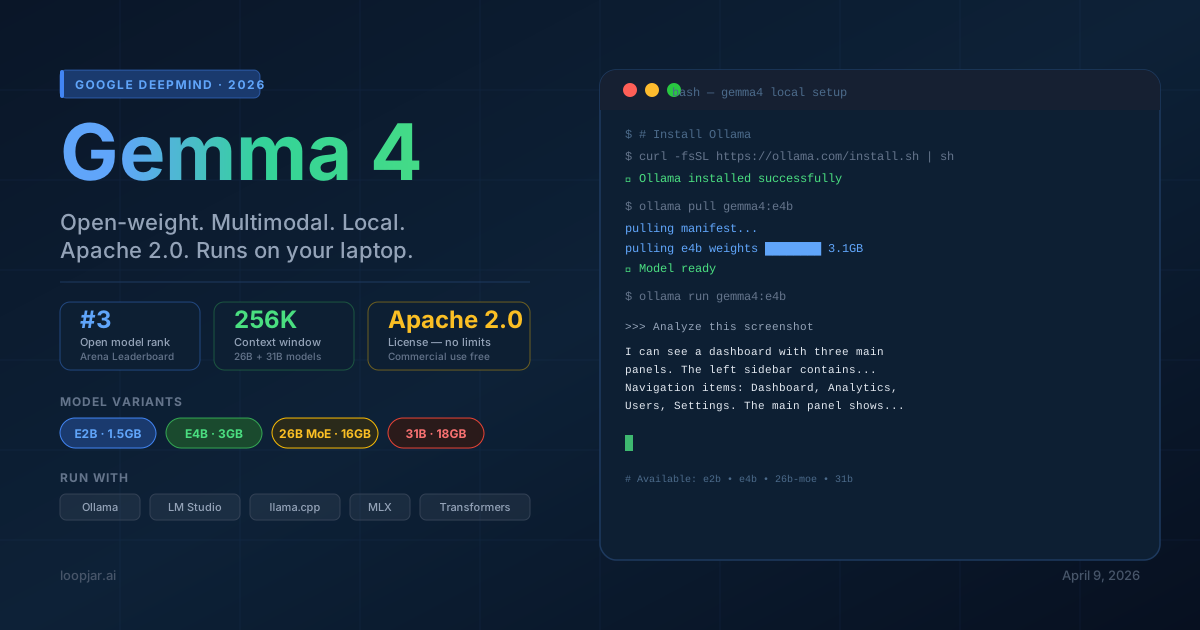
Meet Gemma 4 — a four-model family ranging from a 2.3B model that runs on your phone to a 31B dense model that ranks #3 among all open models on the Arena leaderboard, beating competitors with over 400 billion parameters.
If you've been waiting for a local LLM that doesn't require a data center, a special license, or a six-figure GPU budget — this is the one. This guide covers what Gemma 4 is, how it performs, and exactly how to run it locally today.
What Is Gemma 4?
Gemma 4 distills insights from Google's proprietary Gemini 3 research into a fully open, locally deployable model family. The stated design principle: maximize intelligence-per-parameter rather than raw scale.
The headline result: the 31B model ranks #27 overall on the Arena AI leaderboard — beating models with 400B+ parameters. The 26B Mixture-of-Experts (MoE) variant activates only 4 billion parameters at inference time and still ranks #6 among open models.
Three things make Gemma 4 structurally different from prior Gemma releases:
- Apache 2.0 license — No monthly active user caps. No acceptable use policy restrictions. No royalties. Fine-tune on your proprietary data, ship commercially, zero licensing cost.
- Native multimodality across all sizes — Every model in the family processes text and images out of the box. The two smaller models also handle audio. No preprocessing hacks required.
- Day-0 ecosystem support — Ollama, llama.cpp, LM Studio, vLLM, Hugging Face Transformers, and MLX for Apple Silicon all supported the day of release.
The Four Models: Which One Is Right for You?
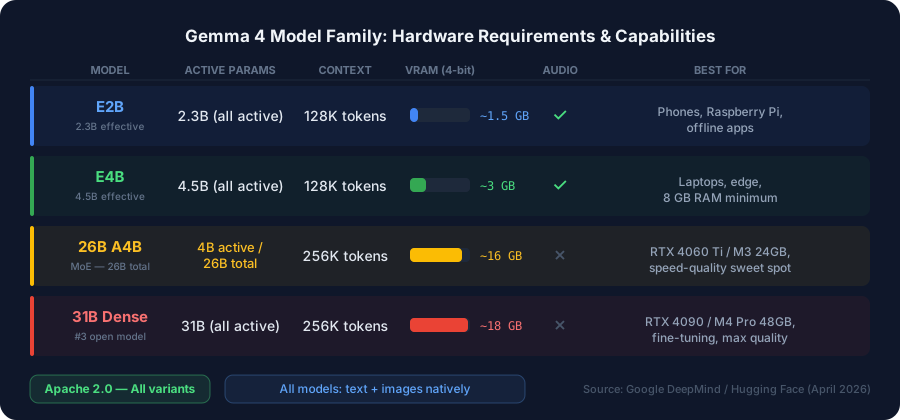
Here's the breakdown of all four variants:
| Model | Active Params | Context | Audio | Best For |
|---|---|---|---|---|
| E2B | 2.3B | 128K | Yes | Phones, Raspberry Pi, offline apps |
| E4B | 4.5B | 128K | Yes | Laptops, edge deployment |
| 26B A4B (MoE) | 4B active / 26B total | 256K | No | Latency-sensitive, 16 GB VRAM |
| 31B Dense | 31B | 256K | No | Max quality, fine-tuning base |
The 26B MoE is the sleeper pick. At inference time it only activates 4B parameters — so it runs with the memory footprint of a small model while achieving near-31B quality. One developer on Hacker News reported running the 26B Q8_0 quantization on an M2 Ultra at 300 tokens per second with real-time video input. That's faster than you can read.
How It Benchmarks
The 31B instruction-tuned model's benchmark results speak for themselves:
| Benchmark | Gemma 4 31B | Gemma 4 E4B | Gemma 4 E2B |
|---|---|---|---|
| MMLU Pro (general knowledge) | 85.2% | 69.4% | 60.0% |
| AIME 2026 (math reasoning) | 89.2% | 42.5% | 37.5% |
| LiveCodeBench (coding) | 80.0% | 52.0% | 44.0% |
| MMMU Pro (multimodal vision) | 76.9% | 52.6% | 44.2% |
| GPQA Diamond (science reasoning) | 85.7% | — | — |
| Codeforces ELO | 2150 | — | — |
The 26B MoE (activating only 4B parameters) scores approximately 2 percentage points below the 31B dense on most benchmarks — a remarkably small gap given it runs at roughly double the token generation speed in latency-critical deployments.
Compared to Qwen 3.5 27B (the closest open-weight competitor): Gemma 4 31B leads on AIME 2026 math (89.2% vs. ~85%) and Codeforces ELO (2150), while Qwen 3.5 holds a slim edge on MMLU Pro (86.1% vs. 85.2%). For most real-world tasks, they trade blows.
Architecture: What's Under the Hood
Gemma 4's architecture introduces several meaningful improvements over Gemma 3:
- Alternating attention layers: Local sliding-window attention (512/1024 tokens) alternates with global full-context attention — efficient for long contexts without attention explosion
- Per-Layer Embeddings (PLE): A second embedding table adds lower-dimensional residual signals per decoder layer, improving representation quality at low parameter cost
- Shared KV Cache: The last N layers reuse key/value states from earlier layers — significant memory savings at inference time
- Native multimodal vision encoder: Learned 2D positions, multidimensional RoPE, variable aspect ratios, configurable token budgets (70–1,120 tokens) per image
- Audio conformer (E2B/E4B): USM-style encoder handling transcription, Q&A, and audio understanding natively
Researcher Sebastian Raschka noted the architectural changes are "relatively modest vs. Gemma 3 — performance gains are primarily driven by improved training recipes and data quality." That's a useful signal: the leap here is largely in training, which means the architecture is stable enough to fine-tune effectively.
How to Run Gemma 4 Locally
Here are four methods, ranked by setup ease. Pick the one that matches your use case.
Hardware Requirements
Before choosing a method, make sure your hardware can handle the model size you want:
| Model | VRAM (4-bit) | Recommended Hardware |
|---|---|---|
| E2B (2.3B) | ~1.5 GB | Any phone, Raspberry Pi, any laptop |
| E4B (4.5B) | ~3 GB | Laptop with 8 GB RAM |
| 26B A4B (MoE) | ~16 GB | RTX 4060 Ti 16GB or Apple M3 24GB |
| 31B Dense | ~18 GB | RTX 4090 24GB or Apple M4 Pro 48GB |
Apple Silicon tip: Unified memory means M1/M2/M3/M4 Macs handle larger models exceptionally well. Use MLX builds for 30–50% faster inference compared to llama.cpp on Mac.
Method 1: Ollama (Recommended for Developers)
Ollama gives you a one-command install, an OpenAI-compatible REST API, and zero configuration for most setups. If you're building an app on top of a local LLM, start here.
# Install (macOS/Linux)
curl -fsSL https://ollama.com/install.sh | sh

# Pull your model variant
ollama pull gemma4:e4b        # Best starting point (~3 GB)
ollama pull gemma4:e2b        # Lightest option (~1.5 GB)
ollama pull gemma4:26b        # High-quality reasoning (~16 GB)
ollama pull gemma4:31b-it     # Maximum quality (~18 GB)

# Start a chat
ollama run gemma4:e4b

# OpenAI-compatible API call
curl http://localhost:11434/v1/chat/completions \
  -H "Content-Type: application/json" \
  -d '{
    "model": "gemma4:e4b",
    "messages": [{"role": "user", "content": "Summarize this codebase structure"}]
  }'
The REST endpoint at localhost:11434/v1 is drop-in compatible with any OpenAI SDK. Swap your base_url and you're running locally.
Method 2: LM Studio (Best for Non-Technical Users)
LM Studio is a desktop GUI app for macOS, Windows, and Linux. No terminal required.
- Download from lmstudio.ai
- Open app → "Discover" tab → search
gemma-4 - Download Unsloth pre-quantized GGUF variants — recommended:
gemma-4-E4B-it-GGUForgemma-4-26B-A4B-it-GGUF - Click "Chat" to start immediately
- For app integration: "Developer" tab → "Start Server" → API at
http://localhost:1234/v1
Context length can be configured up to 128K. Set temperature 0.1–0.3 for precise tasks (code, data extraction) and 0.7–1.0 for creative work.
Method 3: llama.cpp (Maximum Control)
For embedded devices, Raspberry Pi, or when you need fine-grained memory control:
# Run directly from Hugging Face GGUF (no manual download needed)
llama-server -hf ggml-org/gemma-4-E2B-it-GGUF

# Or download specific GGUF manually
huggingface-cli download unsloth/gemma-4-26B-A4B-it-GGUF \
  --include "gemma-4-26B-A4B-it-Q4_K_M.gguf"

# Speed up downloads with hf_transfer
pip install hf_transfer
HF_HUB_ENABLE_HF_TRANSFER=1 huggingface-cli download unsloth/gemma-4-26B-A4B-it-GGUF
Method 4: MLX (Apple Silicon — Fastest on Mac)
If you're on an M-series Mac, MLX gives you 30–50% faster inference than llama.cpp:
pip install -U mlx-vlm

# Text generation
mlx_vlm.generate \
  --model "mlx-community/gemma-4-26b-a4b-it-4bit" \
  --prompt "Explain this function" \
  --kv-bits 3.5

# Multimodal (image + text)
mlx_vlm.generate \
  --model google/gemma-4-E4B-it \
  --image /path/to/screenshot.png \
  --prompt "What UI issues do you see in this design?"
Method 5: Python / Hugging Face Transformers
from transformers import AutoModelForMultimodalLM, AutoProcessor
import torch

model_id = "google/gemma-4-E4B-it"

model = AutoModelForMultimodalLM.from_pretrained(
    model_id,
    device_map="auto",
    torch_dtype=torch.bfloat16,
)
processor = AutoProcessor.from_pretrained(model_id)

# Text-only
inputs = processor(text="What is the capital of France?", return_tensors="pt")
outputs = model.generate(**inputs, max_new_tokens=256)
print(processor.decode(outputs[0], skip_special_tokens=True))
Multimodal Capabilities Worth Knowing
Every Gemma 4 model processes text and images natively. No extra libraries, no preprocessing pipelines. Verified use cases include:
- OCR and document extraction — read invoices, contracts, scanned PDFs
- Bounding box detection — JSON-native output for object coordinates in images
- GUI element detection — identify UI components for screen agents and test automation
- HTML from screenshots — generate code from design mockups
- Video understanding — with and without audio (E2B/E4B for audio)
- Multimodal function calling — combine image input with tool calls in a single pass
The E4B model running multimodal inference on a 16GB laptop for offline document processing is a real, production-viable use case today. Six months ago that required a cloud API.
What the Community Is Saying
The Hacker News thread on Gemma 4's release was unusually positive for an AI announcement. A few standout reactions:
The Apache 2.0 license was the #1 celebrated detail. Prior Gemma releases had restrictive custom licenses with usage caps. Developers who'd been sitting on Gemma 3 integrations finally felt safe shipping commercial products.
The MoE efficiency impressed engineers. "26B parameters, 4B active, ~#6 open model performance — the math doesn't add up in the best way" was a common framing. The 26B A4B achieving near-31B quality while running faster generated significant excitement among inference-cost-conscious teams.
Day-0 ecosystem support was noted as a turning point. "Google actually coordinated with the OSS ecosystem this time" appeared in multiple threads. Ollama, llama.cpp, LM Studio, and vLLM all had working integrations on release day — a stark contrast to past model drops where community ports lagged by weeks.
The skeptics: Researcher Sebastian Raschka and others noted that the architecture is "pretty much unchanged compared to Gemma 3." The gains are real, but they come from training data and recipe quality — not a new architectural breakthrough. That's worth knowing: Gemma 4 is an excellent model, but it's not a paradigm shift the way Gemma 1→2 was.
Use Cases for Product and Engineering Teams
If you're deciding how to use Gemma 4 in your product or infrastructure, here's where the value is clearest:
Local code assistant: Quantized versions of E4B or the 26B MoE run inside IDEs with no latency penalty from cloud round-trips. Codeforces ELO of 2150 on the 31B means it handles real code — not just toy examples.
Privacy-first document processing: Multimodal inference on invoices, contracts, and internal documents that can't leave your network. The 128K–256K context window handles most real documents in a single pass.
Agentic workflows without cloud dependency: Native function calling and JSON output are baked in across all sizes. The 31B reliably chains 3–4 tool calls before accuracy degrades — sufficient for most structured agentic tasks.
On-device mobile AI: E2B was designed for phones and edge devices. Google has announced native Android Studio integration. This is the start of "local-first AI" becoming a product feature, not just a research demo.
Fine-tuning on proprietary data: Apache 2.0 means you can fine-tune on your customer support logs, product data, or internal documents and ship the result commercially. The 31B Dense is the recommended base for domain-specific fine-tuning. Unsloth Studio provides a UI-based pipeline if you don't want to write training code.
Cost reduction for high-volume inference: Teams paying cloud LLM costs per token should model out the break-even on a local GPU against their monthly API spend. For any team doing meaningful volume, the 26B MoE on a single RTX 4090 will typically pay for itself within a few months.
Gemma 4 vs. Competitors: Quick Reference
How Gemma 4 stacks up against the two most comparable alternatives:
vs. Qwen 3.5 27B: Nearly tied overall. Gemma 4 31B leads on math reasoning (AIME 2026: 89.2%) and Codeforces ELO (2150). Qwen 3.5 holds slim leads on MMLU Pro (86.1%) and GPQA Diamond (85.5%). Both are excellent; pick based on your primary task.
vs. Llama 4 Scout (109B total, MoE): Gemma 4 31B generally outperforms Llama 4 Scout on reasoning benchmarks despite being structurally smaller. Meta's Llama 4 has stronger ecosystem momentum; Google's Gemma 4 has the better benchmark story at equivalent active parameter counts.
Getting Started Today
The shortest path to a running local LLM:
# macOS or Linux
curl -fsSL https://ollama.com/install.sh | sh
ollama run gemma4:e4b
That's it. Two commands, under 3 GB of download, and you have a multimodal LLM with 128K context running locally, with an OpenAI-compatible API, zero cloud dependency, and a license that lets you ship whatever you build.
The era of "local LLMs for serious work" is here. Gemma 4 is where you start.
All model weights are available on Hugging Face under Apache 2.0. Gemma 4 is also accessible via Google Cloud Vertex AI, NVIDIA RTX systems, and AMD GPUs with day-0 support. For fine-tuning, see Unsloth Studio or the Vertex AI + TRL integration.