MCP-Powered Feedback Pipelines: How Claude Agents Connect to Your Entire Product Stack
Model Context Protocol lets AI agents talk to every tool in your stack simultaneously — support, CRM, analytics, roadmap — and reason across all of them at once. Here's the architecture behind a real-time feedback intelligence pipeline, and why it makes weekly syncs obsolete.
Priya Nair
Platform Engineering Lead
Your feedback is scattered. A typical mid-size SaaS product team processes signals from seven or more surfaces: support threads, app store reviews, a roadmap board, NPS survey responses, social mentions, G2 reviews, and notes from sales calls. Each surface has its own export format, its own API, and its own update cadence. Connecting them has always meant choosing between two bad options: build brittle point-to-point integrations that move data without synthesizing it, or hire someone to manually stitch the data together every week.
In 2026, there is a third option. Model Context Protocol — the open standard that lets AI agents communicate with external tools through a single unified interface — has matured into the connective tissue that makes a genuinely intelligent feedback pipeline possible. Teams that have adopted MCP-powered pipelines report collapsing their weekly feedback aggregation ritual from hours to near-zero, while surfacing patterns their manual process was missing entirely.
This post explains how those pipelines are built: the four-layer architecture, the tradeoffs at each layer, and the guardrails that keep an autonomous feedback agent useful rather than reckless.
The Integration Sprawl Problem
Most product feedback workflows look like this: a Zapier flow moves data from support to a Notion table. Someone exports a CSV from the survey tool monthly and runs a pivot table. The sales team shares call notes in Slack, where they live and die without ever reaching the product backlog. Each individual integration is a solved problem. The unsolved problem is synthesis.
Moving data from tool A to tool B does not tell you anything. What you want to know is: across all seven sources, what are the top three themes this week? Which accounts are signaling churn risk? What feature gap is driving the most trial-to-paid conversion failures? These questions require reasoning across all sources simultaneously — and no Zapier workflow can do that.
The typical workaround is a weekly sync. Someone pulls data from each source, pastes it into a document, and the team reads through it looking for patterns. This works until volume grows, until someone misses the meeting, or until the person who owns the sync leaves the company. It also introduces a structural latency problem: the signal that a key account is frustrated reaches the CS team six days after it was expressed, not six minutes.
Point-to-point integrations fail at synthesis. Weekly syncs fail at speed. What is needed is something that can read all sources simultaneously, reason about them, and take action — in real time, with full context, and with appropriate human oversight.
What MCP Actually Is (And Why Product Teams Should Care)
Model Context Protocol is a standardized interface for AI models to communicate with external tools and data sources. Instead of writing a custom integration for every AI-to-tool connection, you build one MCP server per tool or functional area — and any MCP-compatible AI client, like Claude, can then use all of your servers through the same standard protocol.
The analogy that has stuck: MCP is USB-C for AI agents. Before USB-C, every device manufacturer had its own connector. After, you plug the same cable into your laptop, phone, monitor, and dock. MCP does the same for AI — one standard interface, everything connects.
From a technical standpoint, an MCP server exposes two things: tools (functions the agent can call, like search_feedback(query, filters) or create_roadmap_item(title, description)) and resources (data the agent can read, like the current roadmap state, account health scores, or the last 30 days of NPS responses). The AI agent — running Claude under the hood — decides which tools to call based on its current task and reasoning state.
What makes this powerful for feedback pipelines is the context window. Claude does not make one tool call and act on the result in isolation. It makes several, holds all the results in memory simultaneously, reasons across them, and then decides what to do. When you search for feedback about your export feature, Claude can simultaneously check how many enterprise accounts mentioned it, whether it correlates with recent churn events, and whether it is already tracked in the roadmap — all before deciding what action, if any, to take.
The Four-Layer Architecture
A production feedback intelligence pipeline built on MCP has four layers. The diagram below shows how they connect and interact:
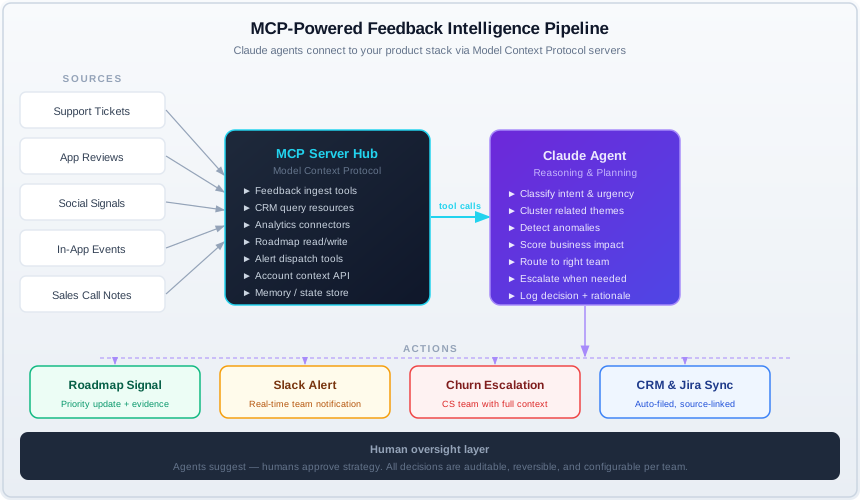
Layer 1: The Collection Layer
Every feedback source your team cares about, normalized into a consistent event format and made queryable. Real-time webhooks where possible (support tickets, in-app events), polling where necessary (review platforms, social mentions). The job of this layer is uniform ingestion — it does not interpret, just collects.
Layer 2: The MCP Server Hub
A set of MCP servers — one per data source or functional area — that expose your normalized feedback data as tools and resources. This is the protocol boundary: everything above speaks MCP, everything below speaks the native API of each source system. The hub handles authentication, rate limiting, and access control.
Layer 3: The Claude Agent Reasoning Engine
The agent that makes sense of what it finds. It runs on a schedule or in response to triggers, calls MCP tools to gather context, reasons across the results, and produces structured output: a routing decision, a priority update, an escalation flag, or a digest summary. This is where pattern recognition and cross-source synthesis happen.
Layer 4: The Action Layer
The downstream integrations that execute what the agent decided — updating the roadmap, filing a Jira ticket, sending a Slack alert, escalating to CS, or enriching a CRM record. Each action is logged with the agent's full rationale attached, making the system auditable and its decisions reversible.
Building the Collection Layer
The collection layer has one job: ingest events from every source and make them queryable in a consistent format. Consistent is the operative word. A support ticket from Intercom, a one-star review from the App Store, and an in-app rage-click event are all signals about product friction — but they arrive in completely different formats, with different schemas, timestamps, and severity indicators.
The normalized event format you want includes: source type, account identifier, user identifier, raw text or structured payload, timestamp, and a severity or confidence score where the source system provides one. Storing this in a single time-series table — Postgres with a JSONB metadata column works well — gives you a unified query surface that your MCP server can expose cleanly.
For real-time ingestion, use webhooks from your support platform, in-app SDKs that emit events on key user actions, and webhook subscriptions from survey tools. For sources without webhook support — app store reviews, G2, many social listening platforms — a five-minute polling interval is usually sufficient. The agent should never pull directly from Intercom's API in real time; it should read from your normalized, indexed store. Keep the agent fast and isolated from upstream latency.
One non-obvious design decision: include a deduplication identifier in your normalized event. Customers often report the same issue across multiple channels — a support ticket, an NPS open-text comment, and a reply to your changelog email. If your agent sees three separate events, it inflates the apparent severity. A fuzzy-match dedup job running on ingestion — using embedding similarity against recent events — is one of the highest-leverage investments in the collection layer, and the one most teams skip until it causes a false escalation.
Designing Your MCP Server
Your MCP server is the interface between Claude and your feedback data. Its design determines what the agent can and cannot do, so it deserves careful thought. The tools you expose should map to the questions your agent needs to answer, not to the underlying data model. Avoid leaking schema details into the tool interface.
The core tools for a feedback intelligence MCP server:
search_feedback(query, filters)— semantic search across all normalized events, with filters for date range, source type, account segment, and severity. Returns the top-N matching items with account context attached.get_account_health(account_id)— returns the current health score, recent ticket volume, NPS trend, and any open escalations for a specific account.get_roadmap_item(search_term)— searches your product backlog for existing items that match a given topic, so the agent checks for duplicates before creating anything new.create_roadmap_item(title, description, source_ids)— creates a new backlog item with source evidence linked. Source IDs connect back to the original feedback events for full traceability.flag_for_escalation(account_id, reason, urgency)— creates a CS escalation task with the agent's reasoning attached for the team to review.dispatch_alert(channel, message, metadata)— sends a structured alert to a Slack channel or other notification surface.
Keep tool interfaces narrow and typed. An agent that can call run_arbitrary_sql(query) against your database is a security and reliability liability. An agent that can call search_feedback(query, filters) is predictable, auditable, and safe to run without constant supervision. The MCP server layer is where you enforce access control and operational boundaries — treat it like an API you are designing for an external developer, not an internal script.
Authentication between your agent and your MCP servers should use short-lived tokens scoped per resource type. The agent needs write access to the roadmap and action layer, but only read access to raw feedback events and CRM data. Principle of least privilege applies exactly as it does in any API design. An agent that can only read what it needs and only write what it is supposed to is dramatically safer to iterate on.
The Intelligence Engine: What Claude Actually Does
The agent's core loop is conceptually simple: receive a trigger (a new batch of events, a scheduled digest run, or an on-demand query), gather context through MCP tool calls, reason about what it found, and produce structured output. The reasoning step is where the value concentrates — and where an LLM-based agent does things a rules engine cannot.
A simple rules-based system can route a high-severity support ticket to the right team queue. A Claude agent can do something more useful: it can recognize that five medium-severity tickets from five different enterprise accounts all describe the same underlying issue — even when they describe it in completely different words — and that this pattern represents a higher-priority signal than any individual ticket's score would suggest.
Theme clustering is the agent behavior that consistently surprises product teams the most. When you ask Claude to group 200 recent feedback items by underlying theme — not by tag or keyword, but by the actual product problem being described — the clusters it produces often reveal structural issues that keyword search would miss. "Can't find the export button," "the download feature is broken," "why did they remove CSV export," and "our data team can't pull the data they need" are four different descriptions of the same gap. A keyword search for "export" catches two of them. Semantic clustering catches all four.
Anomaly detection is the second high-value behavior. Your agent can be configured to watch for sudden increases in feedback volume on a specific topic, NPS score drops correlated with a recent release, or multiple high-value accounts raising the same issue within a 48-hour window. These are signals that require fast action, and an agent configured to escalate anomalies immediately — rather than queuing them for the next weekly digest — is the main lever that separates real-time pipelines from faster versions of the old workflow.
One design pattern that improves agent quality significantly: give it access to its own prior outputs. If the agent wrote a summary three days ago noting that export performance was becoming a theme, and today it sees five more mentions, it should recognize the continuation and escalate rather than treating the pattern as new. A simple memory store — a table of prior agent outputs, accessible via a search_prior_insights(topic) tool — enables this continuity. Without it, the agent reinvents the same analysis on every run and never escalates a worsening trend on its own.
A Concrete Walkthrough
Consider an enterprise account: 120 seats, renewal due in 60 days. On a Tuesday afternoon, their lead analyst opens a support ticket: "Our data exports are taking 45 minutes for monthly reports. This is blocking our finance team's end-of-month workflow." At the same time, in your previous week's NPS survey responses, two other users at the same account mentioned export speed in their open-text comments. Neither was flagged as high severity individually.
Without an MCP pipeline, this plays out predictably: the support ticket gets routed to tier-1 support. The NPS comments sit in a spreadsheet. The account manager has no visibility into the pattern. In 59 days, the renewal conversation happens and the customer mentions export performance as a key reason they are evaluating alternatives.
With an MCP pipeline, the Tuesday afternoon ticket triggers the agent. It calls search_feedback scoped to this account and the last 30 days, and finds the two NPS comments. It calls get_account_health and sees the 60-day renewal flag. It calls get_roadmap_item("export performance") and finds an existing backlog item marked as deprioritized. It calls search_prior_insights("export") and finds no prior escalation for this account. It then produces three outputs in sequence: a Slack alert to the CS team flagging the cross-source pattern and the renewal date context; an update to the roadmap item bumping its priority with the three supporting evidence items linked; and a CRM note on the account record summarizing the theme.
Total elapsed time from ticket creation to all three outputs: under two minutes. The CS manager opens Slack, sees the alert, and schedules a call before the end of the day. The product team sees the roadmap item updated with fresh evidence from a renewal-critical account. The pattern is caught and acted on before it becomes a churn reason — which is the only outcome that actually matters.
The Latency Dividend
The compounding effect of faster feedback cycles is underappreciated. Teams that move from weekly aggregation to real-time routing do not just respond faster to individual issues — they build a fundamentally different kind of product intuition. When patterns surface in hours instead of weeks, you start catching early signals before they become documented complaints. You notice when a beta release is causing friction among a specific user segment before support volume spikes. You see churn risk building on enterprise accounts before the renewal conversation is already half-lost.
Teams that have operated real-time feedback pipelines for six months or more consistently report the same finding: roadmap prioritization quality improves, not just because they have more data, but because the data is recent enough to reflect the current state of their product rather than the state it was in three weeks ago. Stale feedback leads to stale roadmaps. Stale roadmaps lead to decisions optimized for a product that no longer exists.
What Humans Must Always Own
Autonomous feedback routing is useful. Autonomous product strategy is dangerous. The distinction matters, and teams that blur it create a different set of problems than the ones they were trying to solve. There are four categories of decision that should never be delegated to an agent, regardless of how coherent the reasoning looks:
- Roadmap strategy. An agent can surface that export performance is becoming a pattern across enterprise accounts. It should not decide that export performance outranks the accessibility improvements scheduled for next quarter. That tradeoff involves business context, team capacity, and values that no model can fully represent.
- Customer-facing communication. An agent can draft a response or prepare talking points, but a human should send it. Tone, relationship context, and the implications of specific promises require judgment that belongs to the person who will be accountable for them.
- Pricing and contract decisions. If an account is at risk, a human should decide what to offer. An agent that can autonomously authorize discounts or contract changes is a significant liability — both financially and in terms of setting customer expectations.
- Irreversible actions. Deleting records, closing accounts, sending mass notifications — these require explicit human authorization every single time, with no exceptions in the agent's permission model.
The practical implementation of the human oversight layer is a two-tier structure: a weekly digest review and a real-time anomaly alert channel. The digest gives product and CS leadership a structured summary of what the agent observed, clustered, and acted on that week — so the team maintains visibility without needing to be in the loop on every event. The alert channel surfaces only urgent, anomalous signals: sudden volume spikes, renewal-critical account patterns, or agent confidence scores below the threshold for autonomous action. This structure keeps humans informed without creating the alert fatigue that makes oversight theater rather than oversight.
Getting Started
If you are building this from scratch, start with the MCP server rather than the agent. A well-designed MCP server for your feedback data is useful immediately — you can connect it to Claude in a conversation interface and answer ad-hoc product questions before you have any autonomous pipeline running. "What are the top three themes in enterprise feedback from the last two weeks?" is a query you can run manually from day one, and the answer will tell you whether your tool design and data collection are actually working before you invest in automation.
The autonomous pipeline comes second. Begin with a scheduled digest agent that runs nightly, summarizes patterns, and posts a structured report to a Slack channel. This is low-risk, immediately useful, and gives your team the experience of reading agent output — which builds the intuition needed to tune prompts, confidence thresholds, and escalation rules for more autonomous action over time.
Teams that have shipped this pattern consistently report the same finding: the highest-value improvement is almost always the deduplication and cross-source correlation step, not the autonomous actions. The ability to see that the same issue appeared across support, NPS, and social in the same week — before you had to manually correlate three spreadsheets — is where the real leverage lives. Automation of downstream actions is valuable, but the intelligence layer is what changes how product teams think, and that changes before any automation ships.